
Computer security is important for me since the personal computer contains confidential papers, stored passwords, business-related documents, and many other important things. Tasks that would normally be considered safe, such as opening attachments, visiting websites, or even installing software, can introduce a virus into the computer. Therefore, it is necessary for me to install security programs to prevent such attacks.
What is IObit Malware Fighter
IObit Malware Fighter is a security application designed for Windows that can identify and eliminate malware. The software is capable of identifying and blocking different types of threats, such as viruses that spread across files, spyware that steals sensitive data, ransomware that encrypts files, and trojans that pretend to be authentic applications. Removing the infections can minimize the possibility of unnecessary software disturbing the computer’s operations or damaging its files.
Features That Help Me Strengthen My PC Security
Triple Engine Protection for Better Threat Detection
A particular characteristic that I believe is essential is triple engine protection. The antivirus has three engines: Bitdefender Engine, IObit Anti-Malware Engine, and IObit Anti-Ransomware Engine. It offers several levels of malware protection. This is appealing to me because various forms of threats may target different components of my PC. The update in the detection engines and threat database is aimed at improving scan accuracy and identifying new threats.
AI Script Guard for Modern Security Risks
The AI Script Guard feature is quite significant at the moment since many individuals rely on AI to carry out automated tasks using computers. The scripts may contain malicious instructions that may interfere with system configurations as well as damage crucial files. The software constantly monitors such scripts and tries to detect malicious code even before their execution.
Real-Time Protection and Security Guards
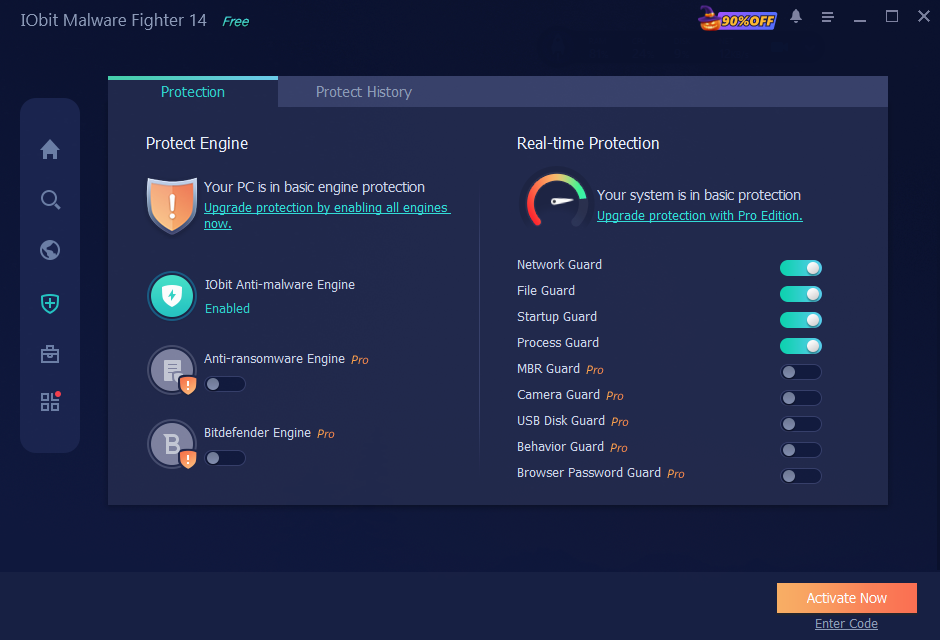
I favor security software that has the ability to automatically detect potential threats, as I do not have to perform a scan every time. The option for real-time protection ensures that any malicious activity is easily detected. There are nine protectors in the program that can secure various aspects of your PC from threats. For example, there are File Protector, Startup Protector, Process Protector, Network Protector, etc.
Browser Protection and Anti-Tracking
As I spend a lot of time on the Internet, it is important to protect my web browser. Surfing Protection is used to detect any suspicious sites and links. While the Anti-Tracking feature gets rid of tracking cookies at the time of closing the browser, the Homepage Advisor takes care of the homepage and the search engine and makes sure that no changes are made without your consent.
Sensitive Data Protection and Safe Box
My personal documents should remain secure when other applications are active. The additional protection that comes from the use of Sensitive Data Protection and Safe Box keeps the confidential files safe. I can select the type of files to be safeguarded or place particular files and folders in Safe Box, which uses password-based access controls. Another security measure in the form of ransomware protection exists.
Improved Password and Email Protection
Although saved browser passwords make surfing the web easier, they require some sort of protection. Browser Password Guard, which has been updated to protect browser passwords that are locally stored, ensures their safety from any unauthorized use. Email Protection is another important feature that I appreciate because email links can sometimes pose a danger.
Faster Scanning and Wider Coverage
I do not want the scans to be slow. The new scanning engine has increased the speed at which the scans are conducted, according to information provided on the website, which states that full scans could be up to 30% faster. Another improvement is with startup items’ scans.
How I Use IObit Malware Fighter to Protect My Computer
I like making things easy when it comes to security. This is how I would go about implementing the software.
Step 1: Download and Install the Software
I visit the official site of IObit and download this free antimalware. Once installed, I open the software and check out the security settings on the dashboard.
Step 2: Choose a Suitable Scanning Mode
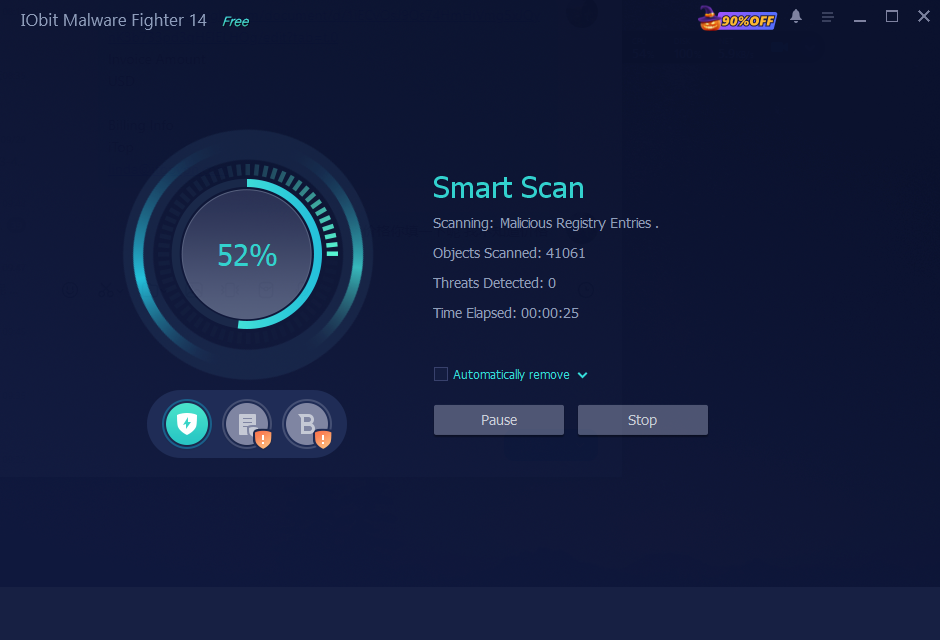
I go to the scanning options and select Smart Scan to get an overview of important system components. I go for Full Scan if I want to run a detailed scan on all hard drives. There is the option of selecting Customize Scan to scan a particular file or folder.
Step 3: Review and Remove Detected Threats
Once the scanning process is complete, I proceed to analyze the findings. After detecting any virus or malware file, I use the steps outlined in the program to delete the software. However, I do not delete any unidentified files by hand.
Step 4: Enable Real-Time Protection
My fourth step was to move on to examine the protection and activate real-time security. The areas I consider are file, startup, process, USB, and behavior protection to monitor anything unusual.
Step 5: Configure Browser Protection
I look over the security options available when using my browser and then switch on the various functions like surfing safety, anti-tracking, download protection, and browser password guard features. I also make sure that I can use the relevant and ideal browser third-party tools as necessary.
Step 6: Secure My Important Files
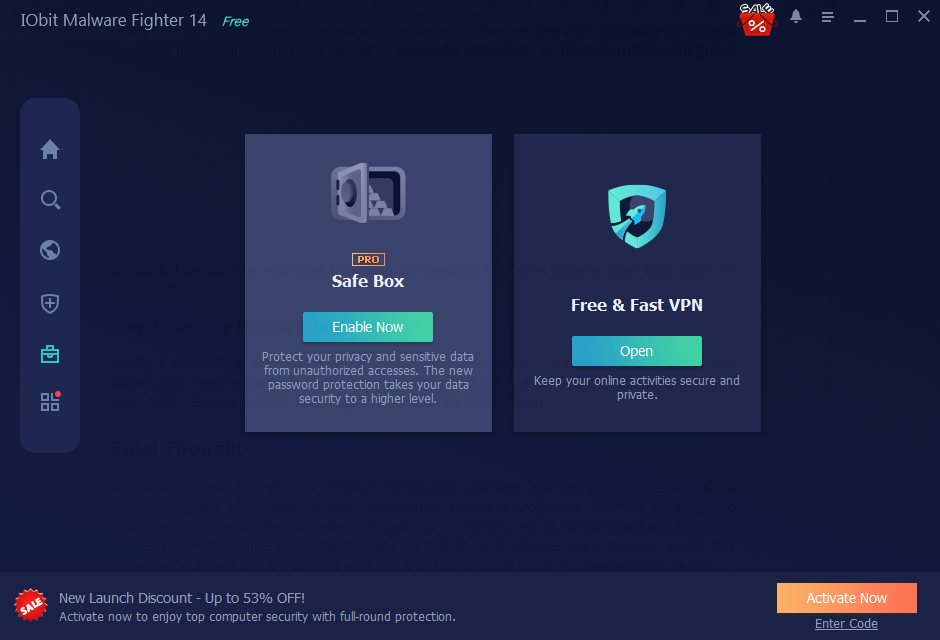
Lastly, I install Safe Box and Sensitive Data Protect software. I create a list of my files and folders that need protection, create a secure password for it, and keep its backup somewhere safe. Also, I ensure periodic scanning and updates for this software.
Final Thought
According to me, PC security requires continuous attention and not sporadic efforts. IObit Malware Fighter offers anti-malware functionality, real-time protection, browser security, and protection of sensitive files in a single application. The advanced AI Script Guard and three-tier engine protection make it compatible with current security requirements. Regular scans and proper security settings are the two additions that I will include in my PC maintenance routine.
